

Peptides Calculator 7.0 Adds Recipe Builder, 790-Recipe Cookbook on Android
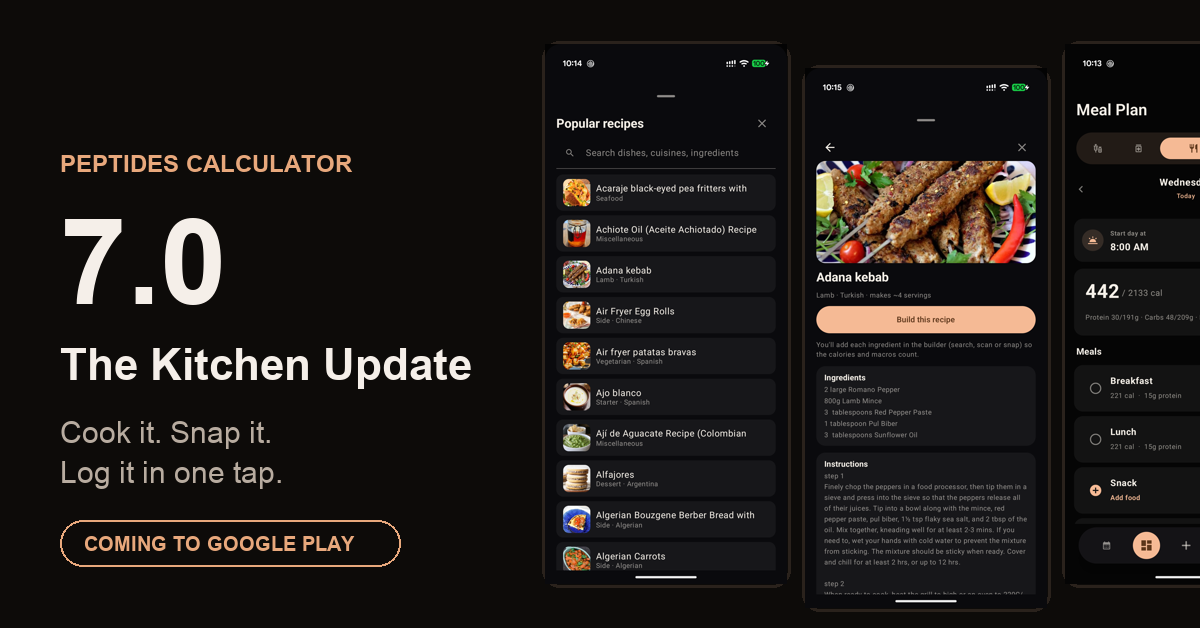
Calculator 7.0 — the Kitchen Update — brings a Recipe Builder, a 790-recipe cookbook, and photo food search to Android.
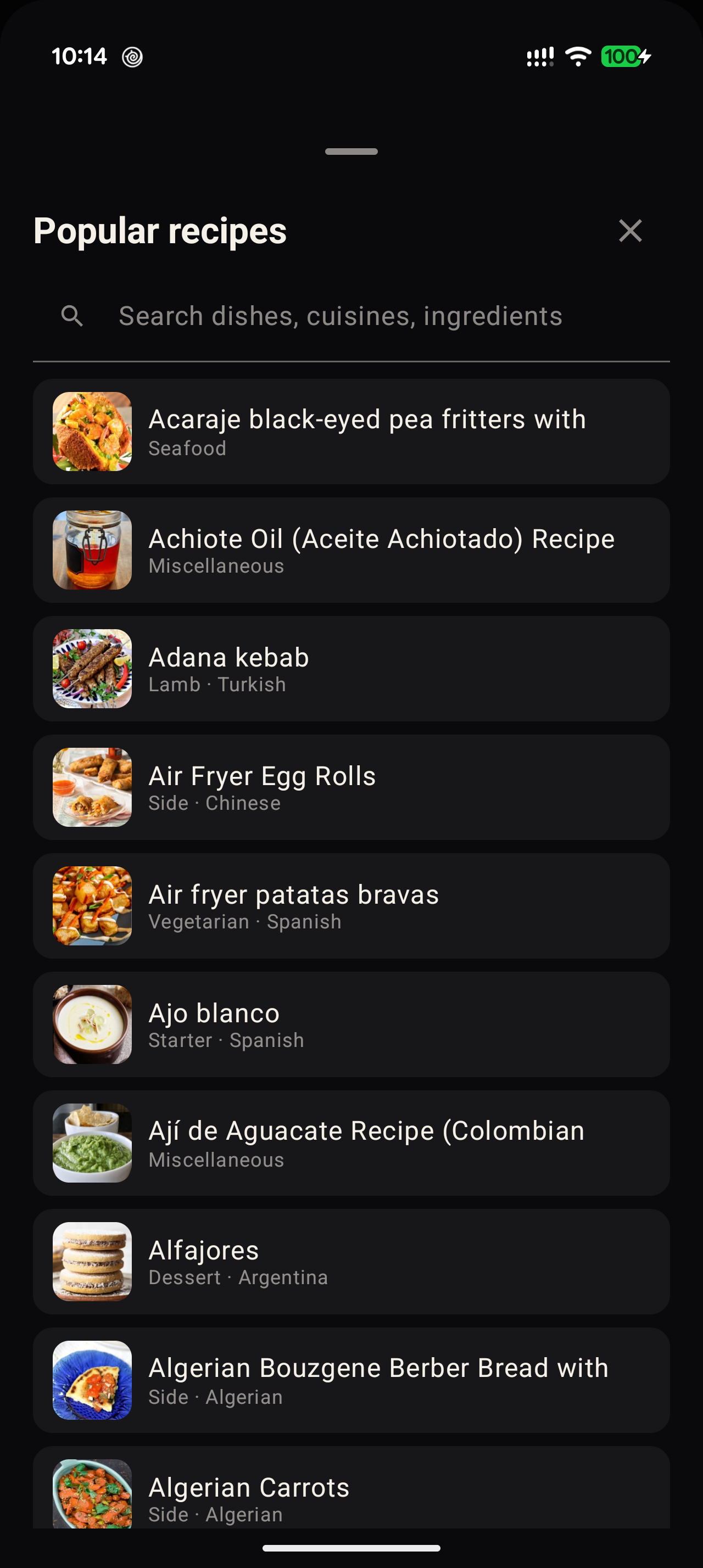
The built-in cookbook: 790 dishes from world cuisines, searchable by name, cuisine, or ingredient — each with photo, ingredients, and instructions

Tapping "Build this recipe" pre-fills the Recipe Builder with the dish's servings and a shopping-list of ingredients — real nutrition comes from the real ingredients added.

Food search now shows the actual product — branded foods and single ingredients alike — with exact matches ranked first, drawing on USDA and Open Food Facts data
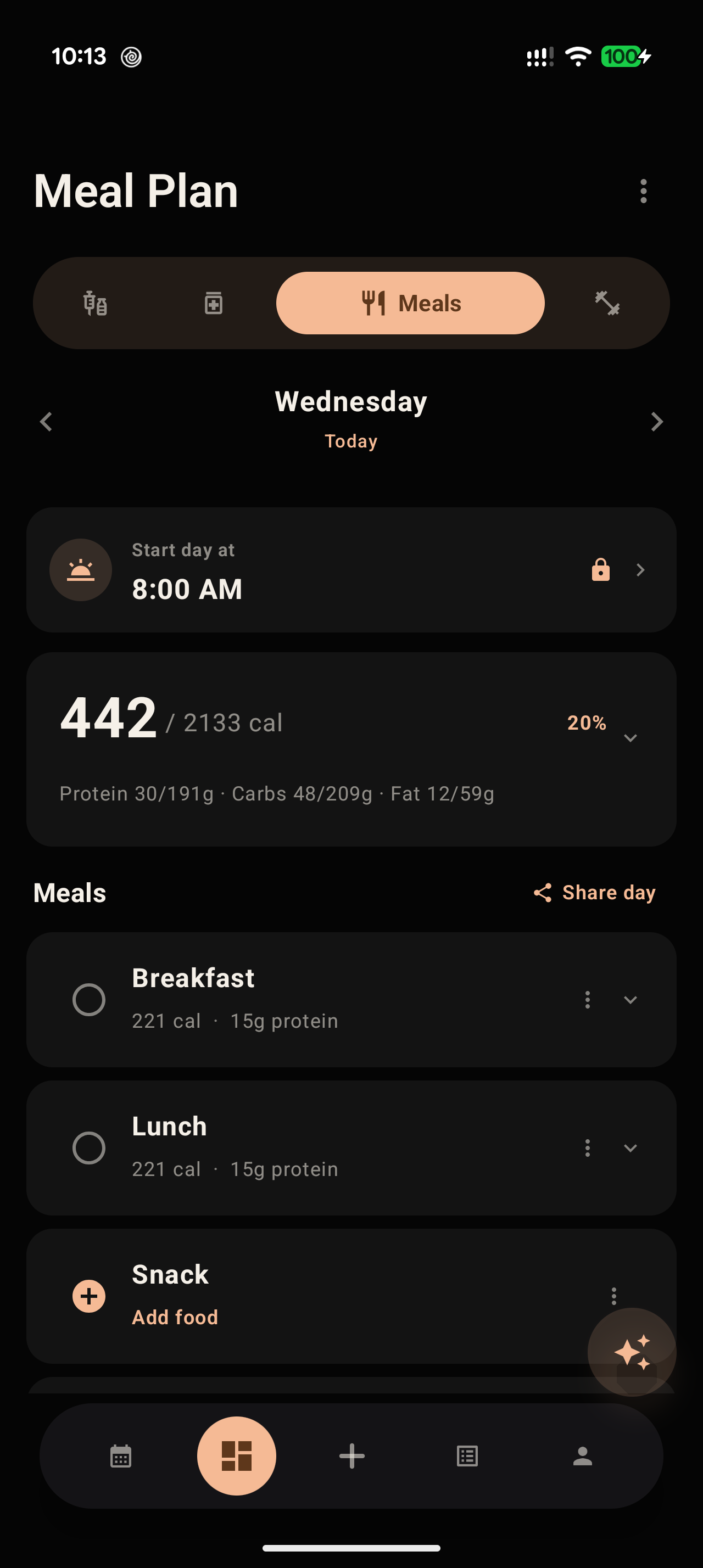
The redesigned planner fits a full day on one screen: collapsible calorie summary, one-tap "Add food" on empty meals, and full-screen nutrition labels a tap away
The Kitchen Update lets researchers log home-cooked meals in one tap, browse a 790-recipe cookbook, and search foods by photo — free for every user.
WASHINGTON, DC, UNITED STATES, September 2, 2026 /EINPresswire.com/ -- Peptides Calculator, the peptide calculator app built for the peptide research community, today released version 7.0 of its Android app — the largest nutrition update in the product's history. Nicknamed the Kitchen Update, the release is built around a single observation: food tracking works well for packaged products with barcodes and menu items from databases, and then falls apart the moment someone actually cooks. Version 7.0 closes that gap with a full Recipe Builder that turns a home-cooked dish into a one-tap log entry, a built-in cookbook of 790 recipes with photographs and step-by-step instructions, food search results that display real product photos, a redesigned meal planner and calendar, and an exercise library that grows from 64 movements to more than 900. Every feature in the release is free for every user.
The update arrives as the app's community — more than 50,000 researchers who track peptide cycles, log lab work, and study their own physiology over time — has increasingly adopted its nutrition tools as a daily companion alongside cycle tracking. Where earlier releases focused on generating meal plans with AI, 7.0 focuses on the harder, more human problem: capturing what people really eat, including the meals they make themselves.
"Every nutrition app handles the frozen dinner perfectly — there's a barcode, you scan it, done," said Himanshu Batra, founder of Peptides Calculator. "But the people in our community who care most about their nutrition are exactly the people who cook. They make a pot of something on Sunday and eat it four times, and every tracking app on the market makes them re-enter it four times, badly, or give up. The Recipe Builder exists because the most nutritionally interesting meals were the ones falling out of everyone's data."
The release also marks a milestone for the product's Android platform. Peptides Calculator launched on iOS and spent this summer in a deliberate, multi-round parity program that brought the Android app level with its iOS sibling across more than one hundred tracked capabilities — from dose logging and lab analysis to fasting and wellness journaling. With 7.0, Android moves from catching up to leading: the Kitchen Update ships on Android first, with the iOS version to follow.
The Recipe Builder: cook once, log forever
The centerpiece of 7.0 is the Recipe Builder. A researcher making a pot of chili adds each ingredient the way they already log food — searching a verified nutrition database, scanning a barcode, or photographing an ingredient — then tells the app how many servings the whole batch makes. The app does the arithmetic that nobody does at the stove: it sums the complete nutrition of every ingredient in the pot, divides by the batch size, and saves the dish as a single reusable recipe.
From that point on, logging the meal is one tap. The dish appears in the food picker's new Recipes tab, and logging "one serving of chili" adds a single clean entry to the diary — with calories, protein, carbohydrates, and fat calculated for exactly the portion eaten. Ate a serving and a half? Type 1.5. Finished the whole pot? A dedicated Whole Batch option logs it honestly. Behind the single entry, the app carries the full nutrition picture: sixteen nutrients per serving, including fiber, total and added sugars, saturated and trans fat, cholesterol, sodium, potassium, calcium, iron, magnesium, and vitamin D — the same fields a printed nutrition label carries.
The builder was designed for the way cooking actually happens. Each ingredient row shows its serving and calorie contribution. A per-serving summary card updates live as ingredients are added, showing the calorie count and macro breakdown of one serving alongside the whole-batch total. Recipes can be edited later — swap an ingredient, change the yield — and every future log reflects the change. Saved recipes are stored on the device, and a recipe can be deleted without affecting meals already logged from it.
Ingredients can enter the builder three ways, matching how people actually have food in front of them. Database search covers whole foods and branded products. The barcode scanner handles anything with a package, reading standard UPC and EAN codes and returning the product's full label data. And for loose, unpackaged food — the farmers-market vegetables, the butcher-counter cut — researchers can photograph the ingredient and let Mira AI, the app's assistant, estimate its nutrition from the image. A half-built recipe survives interruptions: the draft persists through phone rotations, app switches, and even the detour out to the barcode scanner, and backing out of an unsaved recipe asks before discarding anything.
During development, the company tested the flow against a deliberately non-technical standard: could a busy 45-year-old home cook, with no interest in nutrition databases, build and log a real dinner without instructions? The team ran the full journey repeatedly from that persona's perspective, scoring it after each revision. The flow was reworked until it scored a nine out of ten — full-screen ingredient confirmation modeled on the best consumer nutrition apps, plain-language serving sizes such as "1 cup" and "1 slice" instead of gram weights, one-tap quantity fractions, and protection against accidentally discarding a half-built recipe.
A 790-recipe cookbook, built in
Not every meal starts with a recipe already in hand, so 7.0 ships with a built-in cookbook: 790 dishes from cuisines around the world — Turkish kebabs, Spanish patatas bravas, Argentinian alfajores, Egyptian, Japanese, French and dozens more — each with a photograph, a complete ingredient list with measures, and step-by-step cooking instructions. The catalog is drawn from an open recipe dataset and served through the company's own infrastructure, searchable by dish name, cuisine, or ingredient.
The cookbook connects directly to the Recipe Builder. Finding a dish and tapping "Build this recipe" opens the builder with the dish's name and serving count pre-filled and the full ingredient list pinned as a shopping-list reference. As the researcher adds each real ingredient — the actual tomatoes, the actual ground beef — the app computes true nutrition from what actually went into the pan, rather than estimating from a generic recipe. It is a deliberate design choice: inspiration comes from the cookbook, but the numbers come from real ingredients.
Food search that shows the food
Version 7.0 also changes what food search looks like. Every search result now displays a photograph of the actual product — resolved from the Open Food Facts community database, which catalogs over three million products — so a researcher scanning a results list can recognize the exact item rather than parsing near-identical text entries. The photos appear for branded products and generic single ingredients alike, from a specific brand of Greek yogurt down to the loose tomatoes destined for a recipe.
Search relevance was rebuilt in the same release. Results now rank exact matches of the typed food first — searching "tomato" surfaces the raw tomato before tomato powder, canned sauces, and branded products — a small change that removes one of the most common frustrations in everyday logging. Search draws on both the United States Department of Agriculture's FoodData Central database and Open Food Facts, with verified entries badged so researchers know the source of their numbers. Portion entry was redesigned around household measures: a full-screen confirmation shows the food's complete nutrition label, live-scaled as the researcher switches between units — grams, ounces, cups, slices — and adjusts quantity with one-tap fractions.
A full nutrition label for every logged food
Tapping any logged food now opens a dedicated Food Details screen: the item's photo, serving, calorie and macro summary, and its complete nutrition label — the same sixteen-field panel found on packaging — with editing and removal one tap away. Previously that information was embedded inline inside meal lists, which made long days unwieldy; moving it to its own screen made the daily view dramatically shorter while making the detail richer. The pattern mirrors the company's iOS app, keeping the two platforms consistent for researchers who use both.
A calmer planner and calendar
The Kitchen Update also delivers a broad decluttering of the app's two daily surfaces. On the meal-planning screen, empty meals — previously rows of zeros — became one-tap "Add food" buttons. The daily calorie summary collapses to a single line of numbers by default, expanding on demand to full progress bars and target adjustment. Secondary features moved into menus, and the result is that a full day of meals fits on one screen without scrolling.
The calendar received the same treatment. Dose reminders, meals, and workouts now share a single compact card format, with actions like marking a dose taken tucked behind a tap rather than permanently occupying screen space. A researcher opening the app in the morning sees the whole day — morning dose, breakfast, workout, and the afternoon ahead — in a single screenful.
An exercise library fourteen times larger
Alongside the nutrition work, 7.0 expands the app's exercise library from 64 curated movements to more than 900, built on a public-domain exercise dataset and merged behind the app's hand-tuned defaults. Each movement carries body-part categorization for filtering, sensible set-and-repetition defaults by category — strength movements default differently than cardio or mobility work — and the library remains available offline after first load. The expansion means workout plans can reference everything from a barbell back squat to a Zercher squat without researchers typing custom entries.
The Kitchen Update by the numbers
- 790 recipes in the built-in cookbook, spanning dozens of world cuisines, each with photo, ingredients, and instructions
- 900+ exercises in the expanded library, up from 64 — a fourteen-fold increase
- 16 nutrients tracked per recipe serving, matching a printed nutrition label
- 3,000,000+ products in the Open Food Facts database that powers search photography
- 2 nutrition databases behind search: USDA FoodData Central and Open Food Facts, with verified-source badging
- 1 tap to log a saved recipe — down from re-entering every ingredient, every time
Free for every user
Every feature in 7.0 — the Recipe Builder, the 790-recipe cookbook, photo-rich search, the Food Details screen, the redesigned planner and calendar, and the expanded exercise library — is available to every user at no cost. The company has kept its core tracking tools free since launch, reserving subscription pricing for AI-intensive features such as photo-based meal recognition, which remains available to free users through a monthly allowance of Mira AI credits.
"We thought hard about paywalling the Recipe Builder — it's the kind of feature competitors charge for," Batra said. "We decided the opposite. Accurate logging of home cooking makes everyone's data better, and the community has been generous with feedback that shaped this release. The features that cost us real money per use, the AI-heavy ones, are where the subscription lives. Cooking your own dinner shouldn't be a premium feature."
From peptide reconstitution calculator to daily companion
Peptides Calculator began as a free peptide calculator — a peptide reconstitution calculator that turned a vial's milligrams, a chosen bacteriostatic water volume, and a syringe size into an exact draw in units, the arithmetic every researcher does at the bench. That calculator remains the app's front door and is still free, handling simple and complex preparations alike, with syringe-size presets, unit-and-milliliter conversion, and per-dose cost math. Release by release, the app has grown around it into a full research companion. Today its nutrition tools sit alongside descriptive peptide cycle tracking, vial inventory management, injection-site rotation, lab panel analysis with AI-powered comparison insights across draws, an intermittent-fasting tracker, a wellness journal, weight and water tracking, and personalized AI meal and exercise plan generation.
The app's tracking is protocol-agnostic and descriptive by design: researchers define their own entries and schedules, and the app records what they tell it — per-entry scheduling, injection-site rotation, and streak tracking for each active vial — without recommending, prescribing, or selling anything. Researchers using the app typically track multiple cycles in parallel, log lab panels every few months, and — increasingly — run their entire nutrition day through it, from the morning's planned meals to the evening's improvised cooking.
That usage pattern is what shaped 7.0's emphasis on speed of capture. Alongside the Recipe Builder, the food picker's Quick Add surface offers recent foods, starred favorites, saved meal templates, and now recipes as four one-tap lanes, so the second time any food is eaten it is never typed again. Meals can be duplicated across days, saved as reusable templates, and shared as a one-image daily summary with a coach.
The app's design philosophy has remained constant as it has grown — researcher data belongs to the researcher, with diary and cycle data stored on the device rather than warehoused in a vendor cloud, and AI used where it saves real time rather than as decoration. Version 7.0 extends that philosophy to food photography and recipes with a deliberately lightweight approach: product photos are resolved on demand from public databases and cached at the network edge, meaning the company operates no photo warehouse and stores no images of its own. The recipe catalog is served the same way — public data, openly licensed, delivered through infrastructure the company already runs.
What's next
The company confirmed three follow-ups already in development. The Recipe Builder is coming to iOS, bringing full parity to the platform where Peptides Calculator first launched. Mira AI, the app's assistant, will compute per-serving nutrition estimates for the entire 790-recipe cookbook, so browsed recipes can be logged in one tap even before they are cooked. And the app's Snap feature is being extended to break a photographed plate into individual recognized ingredients — turning a picture of dinner into a structured, editable log entry.
The company maintains a public roadmap and changelog at peptidescalculator.app, where researchers can see what is planned, vote on priorities, and follow each release as it ships. Several elements of the Kitchen Update — including one-tap logging of home-cooked meals and better food search — trace directly to community requests submitted there, and the company said the post-7.0 roadmap will continue to be shaped in the open the same way.
Availability
Peptides Calculator 7.0 is available worldwide on Google Play for Android 7.0 and above. The iOS and Apple Watch app is available on the App Store in English and Spanish. The 7.0 update is free, and all features described in this release are included at no cost.
About Peptides Calculator
Peptides Calculator is a peptide calculator and tracker app built for the peptide research community, available on iOS, Apple Watch, and Android. The app provides peptide reconstitution and dosage math, cycle and inventory tracking, lab panel analysis with AI-powered insights, personalized meal and exercise plan generation, recipe building and nutrition tracking, and local-first data storage. Learn more at peptidescalculator.app.
Peptides Calculator provides descriptive tracking tools and does not offer medical advice, prescribe dosing, or replace consultation with a licensed clinician.
Himanshu Batra
Sphnix, Inc
+1 571-217-0000
hello@peptidescalculator.app
Visit us on social media:
TikTok
Legal Disclaimer:
EIN Presswire provides this news content "as is" without warranty of any kind. We do not accept any responsibility or liability for the accuracy, content, images, videos, licenses, completeness, legality, or reliability of the information contained in this article. If you have any complaints or copyright issues related to this article, kindly contact the author above.
